
Packs
A discipline pack is a per-project bundle of four things:
- Roles. A role is a lane preset: a system prompt, an optional provider and model, and default gates. Pick one when you add a lane, once the project has enabled the pack it belongs to. A role’s gates are not yet applied to the jobs its lane works on (see below).
- Skills, installed through the skills manager Ninebrains inherits from Emdash.
- MCP servers for the lanes to use.
- Gates that the pack’s work must pass.
Every pack is off until you turn it on for a project, in Settings → Packs. A project that has not enabled a pack gets nothing from it.
Bundled packs
| Pack | Roles | MCP servers | Gates |
|---|---|---|---|
coding | builder, ui-builder, reviewer | GitHub (hosted), Supabase, Cloudflare, all optional. Vercel is listed as an OAuth catalog link | tests, reviewer; ui-builder adds screenshot |
seo | seo-lead, technical-seo, content-strategist, link-researcher, search-analyst, fact-checker | aeo-search, aeo-visibility, aeo-backlink (hosted), DataForSEO (optional) | seo-evidence; the lead adds reviewer |
research | research-lead, researcher, fact-checker | none | fact-check, reviewer |
A video pack is planned for a later release. It is not built.
All role prompts were written for this project. Every MCP server and skill a pack names must carry an MIT, Apache-2.0, ISC, BSD-2/3-Clause or 0BSD licence; the loader rejects anything else.
How a pack reaches a lane
When a lane launches in a project, Ninebrains writes that launch’s MCP config. It contains the Brain’s server plus the servers of every pack the project has enabled, and nothing from other projects. If you picked a role when you added the lane, the role’s prompt is appended to the agent’s system prompt, for attended Claude lanes and for unattended runs.
A role’s gates are not yet applied to the jobs its lane works on. A job’s gates come from whoever created the job and from your rigor settings. Codex lanes don’t receive the role prompt yet either: Codex has no flag to append to its system prompt.
A server that needs a secret you have not provided is left out with a warning. It is never launched half-configured, and warnings never contain secret values.
Skills
Pack skills install as nb-<pack>-<skill> into the global skills folder (~/.agentskills). Two
consequences:
- Skills are global, so a pack’s skills are visible to agents in other projects too, including agents you run outside Ninebrains. This is an accepted limitation for v0.1.
- The
nb-prefix is reserved. Skill sync removes anynb-*skill it does not want, and removes a pack’s skills once no project has the pack enabled.
Secrets
A pack file names its secrets; it never contains them. Nothing is stored in the pack file or in your preferences.
Set them in Settings → Packs. Under each pack, a secrets section lists every secret its servers need, marked set or missing, with where to get it. Paste a value and press Save:
- The value goes into the OS keychain through Electron
safeStorage, underninebrains.pack.<NAME>. If the OS offers no encryption (or Linux is on thebasic_textbackend), saving fails and says so. It never falls back to plaintext. - It is write-only. The field empties after saving, and the app never sends a stored value back to the window, so there is nothing to reveal. Errors and logs name the secret, never its value.
- Clear removes a value you stored here.
- Only secrets that a loaded pack declares can be set.
A value in the environment variable NINEBRAINS_SECRET_<NAME> (for example
NINEBRAINS_SECRET_GOOGLE_ACCESS_TOKEN) still works, and the page marks it as set outside the app.
The keychain value wins when both exist. New values reach a lane at its next launch. The app reads
the environment it was started with: on macOS, an app opened from the Dock or Finder does not see
variables you set in your shell, so start it from a terminal where they are set, or save the value
here instead.
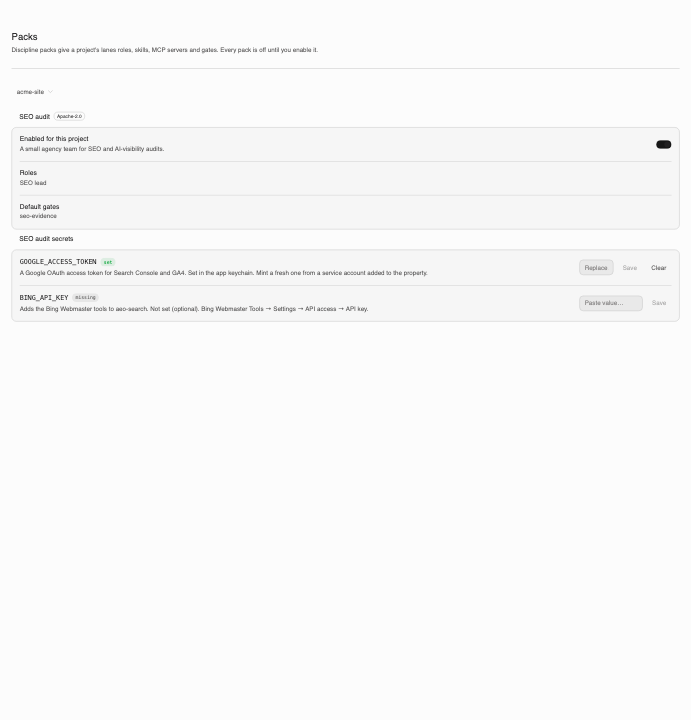
SEO pack
Six roles mirror a small agency team. The pack uses the three MCP servers from Advance Labs’
Apache-2.0 AEO Toolkit: search data from Google
Search Console, GA4 and Bing (19 tools), AI-visibility checks (5 tools) and backlink research (7
tools). It bundles three skills from the same repo: seo-cannibalization, seo-content-decay and
seo-traffic-drop.
The SEO lead writes its report as seo-report.md.
The seo-evidence gate
The SEO team writes its findings to seo-findings.json. Every finding needs at least one piece of
evidence: a query (server, tool, exact arguments, and the numbers cited), a crawl (URL and
observation) or a citation (URL and exact quote). The gate then:
- runs a reviewer in a disposable, read-only checkout, never in the lane’s worktree;
- fetches every cited page itself, through an SSRF-safe fetcher (up to 20 pages);
- checks citation quotes against the page text, which is a deterministic check: a quote that is not on its page fails the finding whatever the reviewer says;
- has the reviewer re-run each cited query on the pack’s servers and mark each finding
confirmed,contradictedorunverifiable.
The gate fails on any contradicted finding, or when more than 20% are unverifiable. If the reviewer cannot use a cited server, the gate fails and says so. It never passes unchecked work.
Hand-check the first audits before you send them to anyone. The gate checks that the cited numbers match the data. It does not check that the data is the right data. The AEO Toolkit’s scoring engine had accuracy bugs that were fixed in aeo-toolkit PR #34.
What the SEO pack sends, and to whom
With the SEO pack enabled and the default server address
(AEO_MCP_BASE_URL = https://aeo.advancelabs.dev/api/mcp), lanes and the evidence reviewer call
Advance Labs’ hosted AEO Toolkit endpoint. They send it:
- your Google access token, as the
Authorizationheader; - your Bing Webmaster key, if you set one;
- any Perplexity key a lane passes to the visibility tools;
- the queries, URLs and site data the tools work on.
The endpoint’s code handles tokens per request, and its route documentation says it does not store them. You are still trusting that deployment. While the default address is in use, the settings page shows this notice, and enabling the pack takes an explicit confirmation step (“Enable and send this data”).
The hosted endpoint is open to use today. It checks an entitlement that will require a plan with MCP access if AEO Toolkit billing is switched on.
Google access tokens expire after about an hour, so whatever supplies the token has to refresh it.
Self-hosting the SEO servers
The three servers are Apache-2.0 in
Advance-Labs/aeo-toolkit, in apps/console, under
the routes /api/mcp/<slug>/mcp. Its docs/DEPLOYMENT.md covers deploying them.
- Deploy the console yourself.
- Set
AEO_MCP_BASE_URLto your base, for examplehttps://seo.example.com/api/mcporhttp://localhost:3000/api/mcp. It is read the same way as a secret, so with the environment resolver that isNINEBRAINS_SECRET_AEO_MCP_BASE_URL.
Then no SEO data goes to Advance Labs. At launch the address is checked again: anything other than
https, or http on localhost, leaves the servers out with a warning.
Coding pack
The coding pack’s servers are all optional. GitHub uses GitHub’s hosted MCP endpoint with your personal access token as a bearer header, so enabling it sends that token to GitHub. Supabase and Cloudflare run as local processes. Vercel is offered as a catalog link that uses Vercel’s own OAuth sign-in.
Research pack
The research pack has no MCP servers. Researchers write claims.json with a source URL and an
exact quote for every claim, and the fact-check gate checks each one. See
Verification gates.
Your own packs
Your own packs are not available in v0.1. The app loads only the bundled packs, and there is no setting or environment variable that changes this.
When they are turned on, a pack’s MCP servers will run with your user’s permissions, like any other program you install. Treat a pack from someone else the way you would treat their code.